# Implement AI Inference in your applications
import DocButton from '~/components/webkit/DocButton.vue';
AI Inference at the edge runs models close to data sources to reduce latency, preserve privacy, and optimize resource usage.
## AI Inference architecture diagram
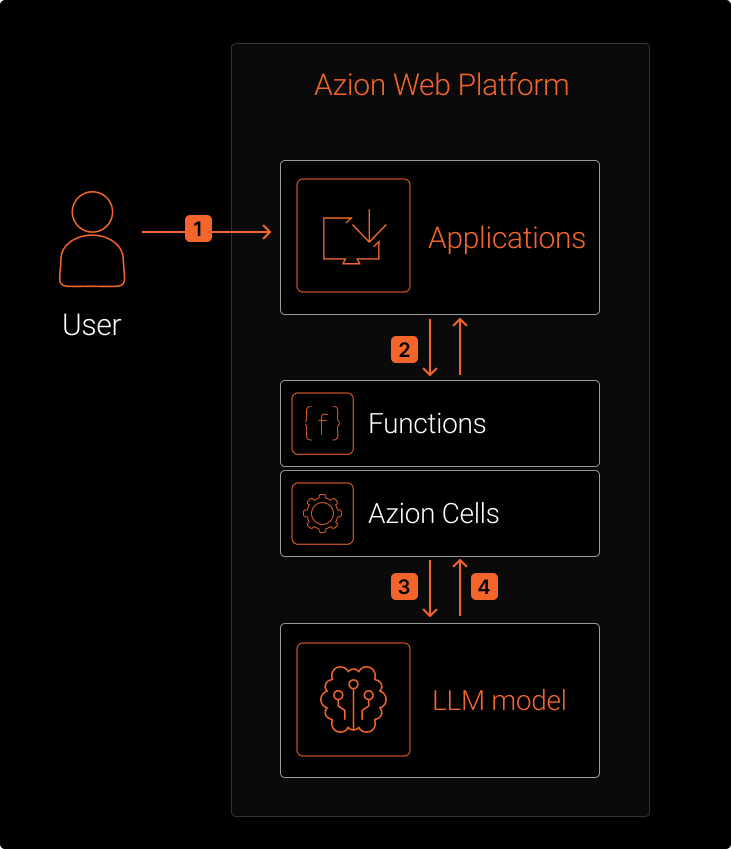
The following figure illustrates a reference architecture for AI inference at the edge.
### Data flow
1. The user sends a request to the application domain.
2. The nearest edge node receives the request and forwards it to the **application** which applies policies and calls the function.
3. The **function** orchestrates the inference: preprocesses input, and calls the model via `Azion.AI.run` through the Azion Cells API.
4. The agent processes the user's input and sends it back to the user through the same path.
## Components
- **Applications**: application layer on Azion's distributed network.
- **Functions**: executes inference logic, orchestrates RAG, and integrates external services.
- **AI Inference (Edge Runtime)**: runs AI models directly at the edge.
- **Global Infrastructure**: Azion's distributed global network.
- **Orchestrator**: manages requests through the Edge Node for Cells execution.
**Note:** Azion Cells is an advanced feature that is part of the Orchestrator. To activate it, you need to contact Azion's sales team to verify requirements and enable the product in your account.
---
## Implementation
Use the [AI Inference Starter Kit](/en/documentation/products/guides/ai-inference-starter-kit/) template to accelerate your journey and have a ready-to-use application with OpenAI-compatible APIs running at the edge.
1. Access the Azion Console.
2. Click the `+ Create` button to open the templates page.
3. Select the `AI Inference Starter Kit` template.
4. On the template page, enter a name for your application and click `Deploy`.
5. Wait for the application to be available at the domain `your-url.map.azionedge.net` (or your custom domain).
6. Interact with the model via your application's OpenAI-compatible endpoint.
Example of interaction with the `nanonets/Nanonets-OCR-s` model, which is an instruction-oriented OCR model that extracts text from images/documents:
```bash
curl -X POST https://YOUR-DOMAIN.map.azionedge.net/v1/chat/completions \
-H "Content-Type: application/json" \
-d '{
"model": "nanonets/Nanonets-OCR-s",
"max_tokens": 500,
"messages": [
{
"role": "user",
"content": [
{
"type": "image_url",
"image_url": { "url": "https://www.any-url-example.com/example.jpg" }
},
{
"type": "text",
"text": "Extract the text from the document above in structured Markdown. Tables in HTML. Equations in LaTeX. Use ... for watermarks and ... for pagination."
}
]
}
]
}'
```
Notes:
- Access the [Azion AI Inference Models](/en/documentation/products/ai/ai-inference/models/) page to see more available models.
- If you added authentication to your API, include the appropriate header (for example, `-H "Authorization: Bearer "`).
Example of a function that executes Azion.AI.run inside a Function:
```ts
async function handleRequest(request) {
const url = new URL(request.url);
if (url.pathname !== "/ocr") return new Response("Not found", { status: 404 });
const modelResponse = await Azion.AI.run("nanonets/Nanonets-OCR-s", {
stream: false,
max_tokens: 500,
messages: [
{
role: "user",
content: [
{
type: "image_url",
image_url: { url: "https://www.any-url-example.com/example.jpg" }
},
{
type: "text",
text:
"Extract the text from the document above in structured Markdown. " +
"Tables in HTML. Equations in LaTeX. Use ... " +
"for watermarks and ... for pagination."
}
]
}
]
});
return new Response(JSON.stringify(modelResponse), {
headers: { "Content-Type": "application/json" }
});
}
addEventListener("fetch", (event) => {
event.respondWith(handleRequest(event.request));
});
```
## Observability
- **[Real-Time Metrics](https://www.azion.com/en/documentation/products/observe/real-time-metrics/)**: analyze events and gain insights into your applications' performance.
- **[Real-Time Events](https://www.azion.com/en/documentation/products/observe/real-time-events/)**: track requests, raw data, logs, and complex queries.
---
## Related documentation
- [AI Inference](/en/documentation/products/ai/ai-inference/)
- [AI Inference Starter Kit guide](/en/documentation/products/guides/ai-inference-starter-kit/)
- [Available models](/en/documentation/products/ai/ai-inference/models/)